Pre-call dossier
A one-screen pre-call dossier on a real prospect — photo, career arc, company, recent LinkedIn posts and who replied to them — condensed into five bullets a rep can read in thirty…
- Built in
- 10 min
- Capabilities
- 6
- Live API calls
- 17

The prompt
Paste it into any coding agent with the Trayo MCP connected.
- + any MCP client


Use Trayo to build a one-screen pre-call dossier. I give you a person's name and company, or just an email address, and you give me everything I should know before the call: photo, current role and career arc, where they are based, what they have posted or engaged with recently, and what is happening at their company that matters.

Turn that into five bullets I can read in thirty seconds: what they care about, the angle to lead with, the likely objection, who else at the account belongs in the conversation, and one specific opener. Put contact details behind a button rather than on the page by default. One person, one screen, no scrolling.
What this app asked Trayo for
Every name, number and email on the page came back from one of these. None of it was typed in.
- Reads your workspace
What you sell, who you sell to, and the buyer personas already saved in Trayo.
- Researches an account
A live snapshot per company — size, stack, why-now signals and why it fits.
- Finds the right people
Named stakeholders at an account, matched to the buying roles you care about.
- Gets verified emails
Work addresses with a confidence signal, so a bad match is visible rather than sent.
- Builds your account list
Imports, updates and organises accounts so the work survives the session.
- Reads social activity
Posts and the people engaging with them, for plays that start from a conversation.
Take the tour
The same run as the video above, one stop at a time.
- 01
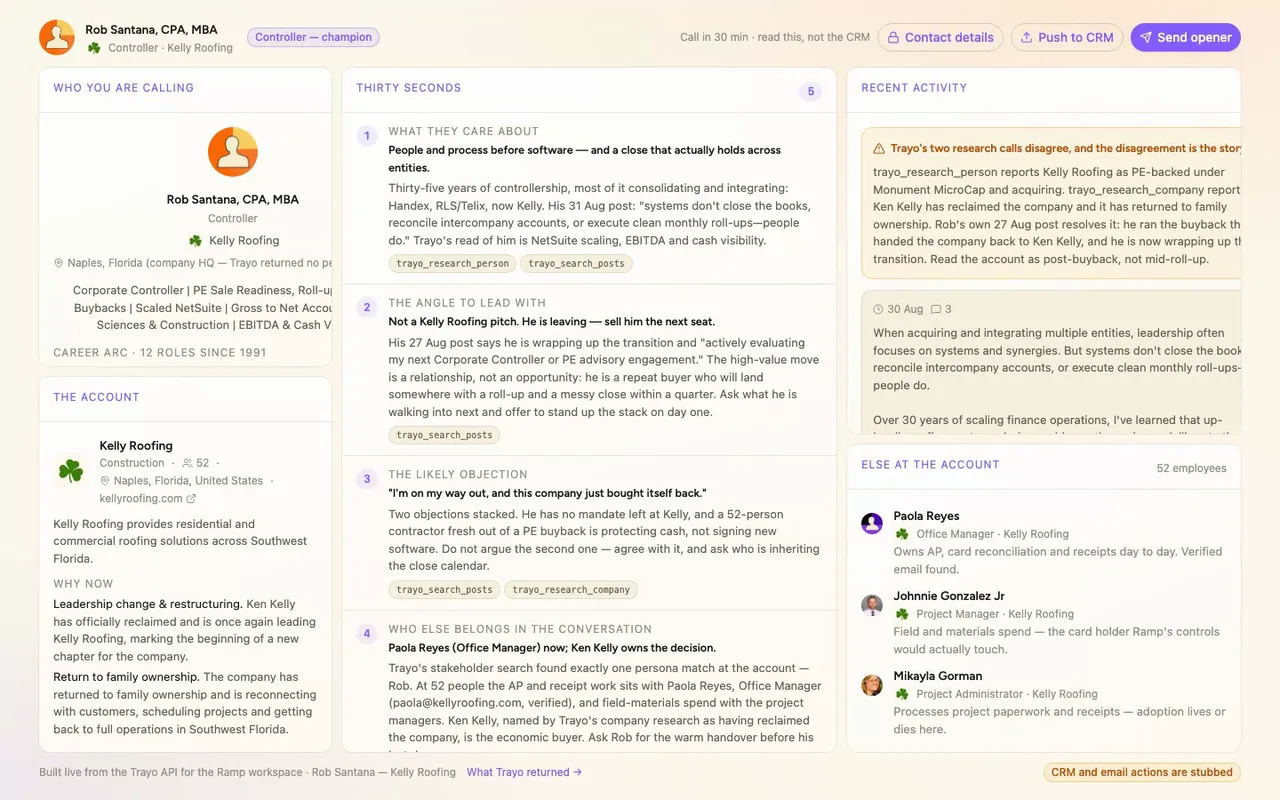
This dossier was built on Trayo, not typed by hand.
- 02
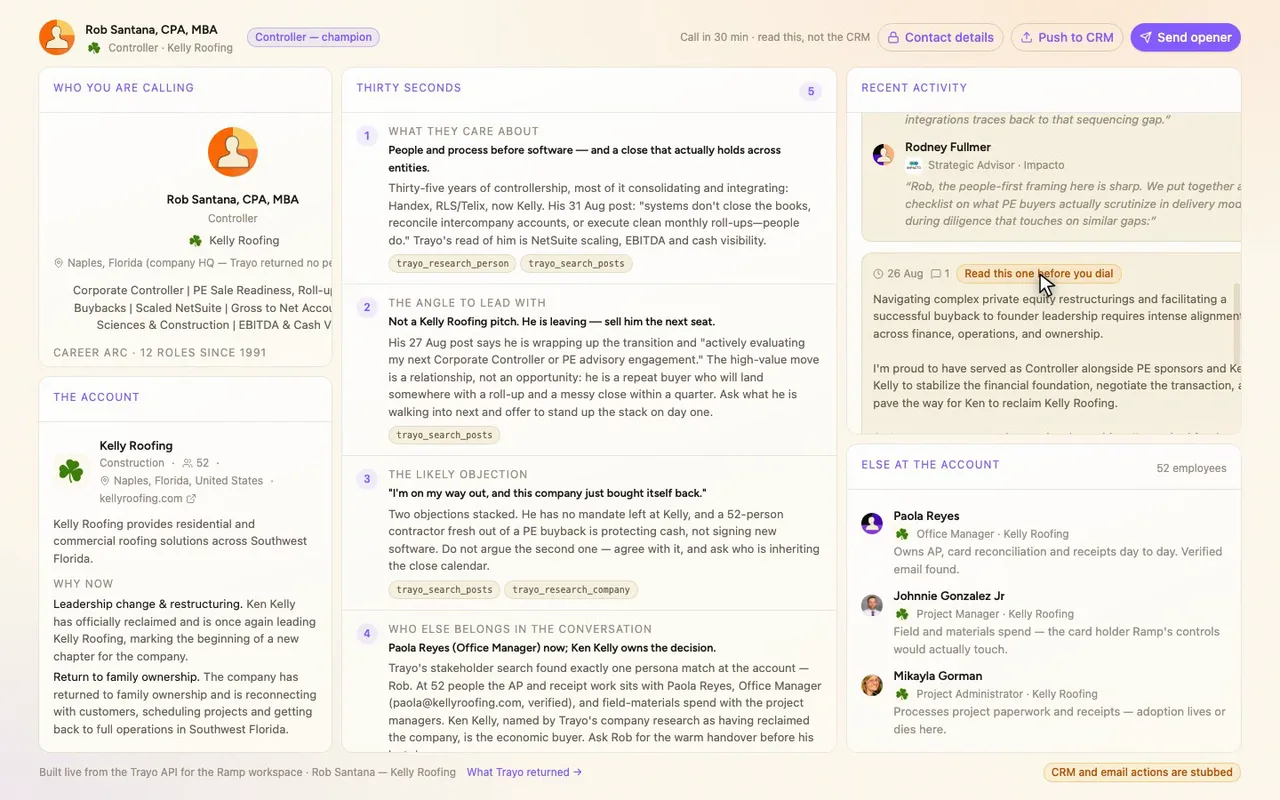
This flagged post is the one to read first.
- 03
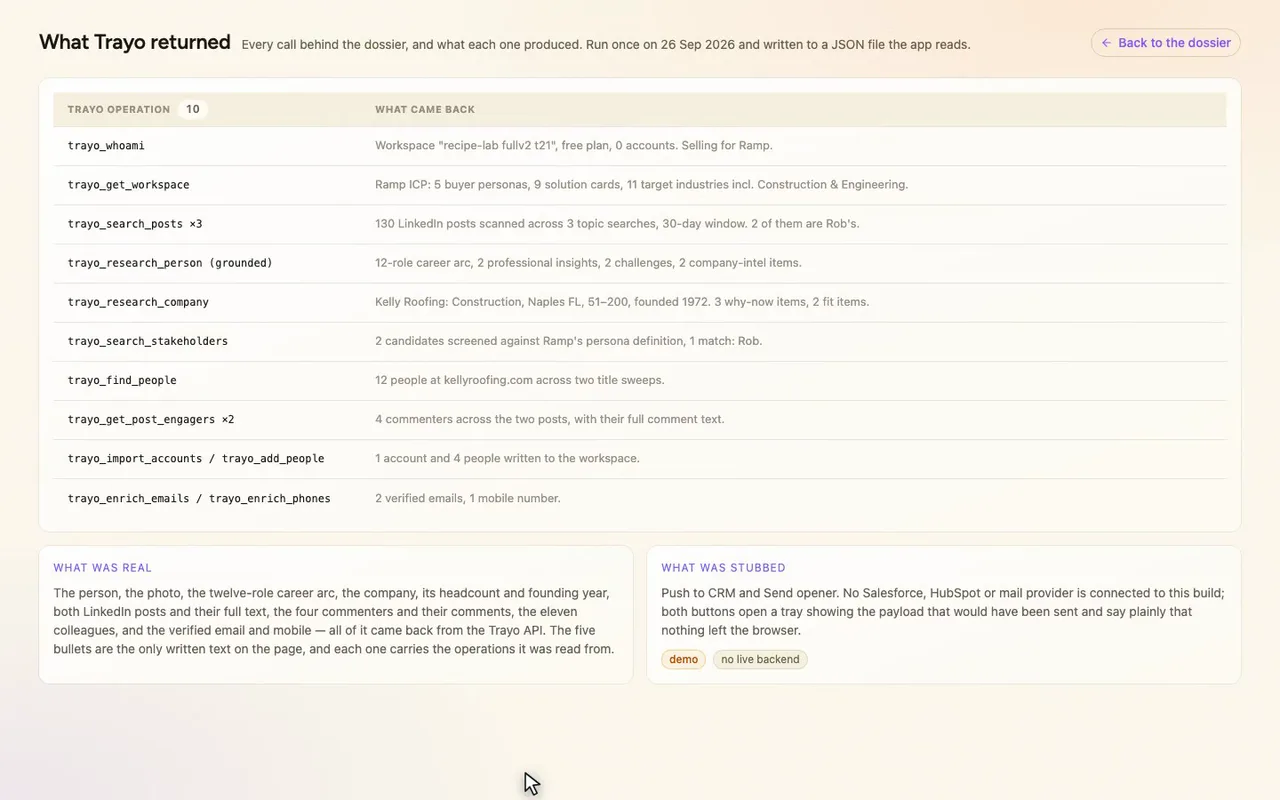
Every Trayo call is logged, one click away.
How it was built
The data behind each screen, and what's faked for the demo.
Someone on Ramp’s sales team gets a call in half an hour and opens this page with a prospect’s name and company. They see the person’s photo, their career arc, where the company is and what is happening there, the two things the prospect posted recently and who replied, and then five numbered bullets: what they care about, the angle to lead with, the likely objection, who else at the account belongs in the conversation, and one specific opener. Each bullet shows which Trayo operations it was read from, so the rep can see where a claim came from. Contact details sit behind a “Contact details” button, because a dossier tends to get read with someone else’s screen in view.
Before a call this usually means a LinkedIn profile, a company site, a scroll through recent posts, a search for colleagues, and a guess at what the person is dealing with, spread over several tabs and about twenty minutes. Here it is one screen. At 1440px nothing scrolls, and the dense panels scroll inside themselves. At 390px it stacks. The photo, logo, posts, comments and contact details are real API output. The five bullets are the only text I wrote.
The workspace was empty and sells for Ramp, so I had to pick the subject. I ran three trayo_search_posts calls over the last 30 days and scanned 130 LinkedIn posts. Most authors were vendors and recruiters, but one was a buyer: Rob Santana, Controller at Kelly Roofing, a 52-person roofing contractor in Naples, Florida. Construction is one of Ramp’s eleven target industries. I ran trayo_research_person (grounded) on him and got a twelve-role career arc back to 1991, two challenges and two company-intel items. trayo_research_company returned the firmographics and three why-now items. trayo_search_stakeholders screened the account against Ramp’s five personas and matched exactly one person, Rob. trayo_find_people, across two title sweeps, returned twelve colleagues. trayo_get_post_engagers returned four commenters with their full comment text. trayo_enrich_emails and trayo_enrich_phones returned two verified addresses and one mobile number. I wrote one account and four people to the workspace.
The two research calls disagreed about the account. The person research described Kelly Roofing as PE-backed and acquiring, and the company research said it had returned to family ownership. Rob’s own 27 August post settled it: he ran the buyback that handed the company back to Ken Kelly, and he is wrapping up and looking for his next role. That changed the whole dossier. The page shows the disagreement instead of smoothing it over, and bullet two tells the rep not to pitch the account to him. Also, trayo_research_person returned no personal location, so the page shows the company HQ and labels it as HQ.
“Push to CRM” and “Send opener” are stubs. No Salesforce, HubSpot or mail provider is connected, so both open a tray that shows the payload and says plainly that nothing left the browser. Everything else on the page is what Trayo returned.